ETI Portal
The back office for small government contractors: time, expenses, contract funding, invoicing and payroll in one portal.
The ETI Portal was built by Einstein Technologies, a small defense contractor, to run its own business. It handles what GovCon small businesses usually patch together from a timekeeping tool, spreadsheets and a lot of email. It tracks every hour and dollar from the charge code to the CLIN to the invoice, and it keeps the audit trail DCAA-style reviews expect.
Built for small contractors
The portal is for small businesses that work as primes or subs on federal contracts and don’t have a back-office department. One person can run time, expenses, funding, invoicing and payroll prep for the whole company.
It replaces:
a separate timekeeping service, plus spreadsheets for everything it doesn’t do
hand-tracked CLIN ceilings, funding and contract modifications
invoices built by copying hours out of one system and into another
receipts, approvals and reminders handled over email
Contract finance
See what each contract has funded, spent and has left, without a spreadsheet.
Contracts, CLINs and charge codes in one structure. Each person gets a dated permission on a charge code, so they can only charge work they’re authorized for.
Rate cards hold each person’s hourly cost and fee by contract and CLIN. A rate change is one new dated row, and cloning a contract or option year can escalate the rates.
Ceiling and funding for value and hours, and spend to date split into labor and travel/ODCs.
Contract modifications with their numbers, dates, amounts and signed documents. Only a fully executed mod changes the CLIN, and every change is kept in a permanent history.
Alerts go to contract managers as a CLIN nears its funding limit or the end of its period of performance.
Date checks: changing a contract’s or CLIN’s dates first lists any time or expenses the new dates would leave outside.
Timekeeping that holds up to review
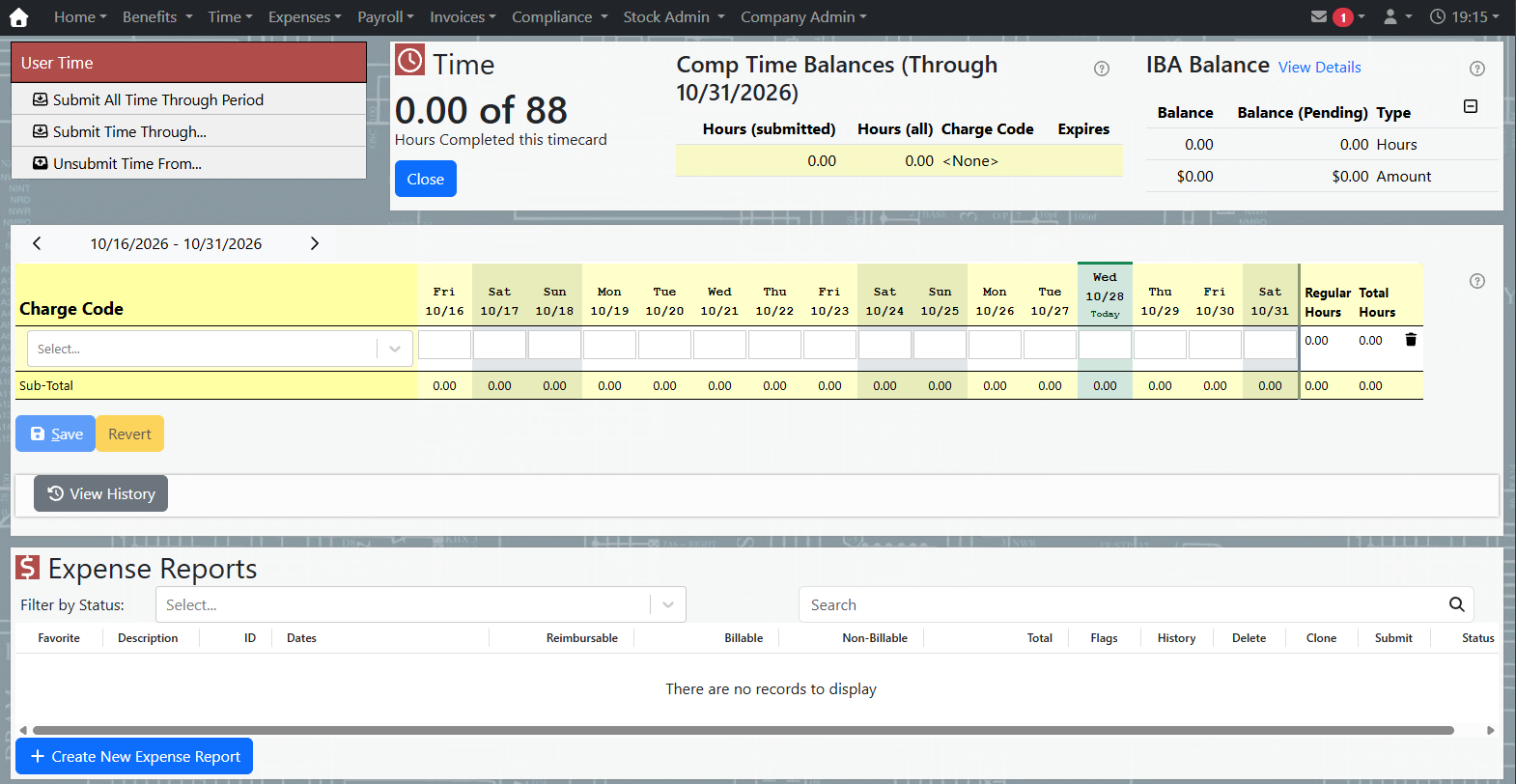
Daily time entry against authorized charge codes, with a full record of every change.
Pay periods with save and submit, supervisor approval and an optional compliance review.
Corrections to closed periods keep the original entry, record the reason and notify the approvers.
Overtime and leave rules: extended work week (EWW), comp time (including warnings before it expires), accrued leave and LWOP.
Reminders for everyone, plus a red banner for supervisors when a timecard is overdue.
Locked periods: the timecard notes which hours have already gone out on an invoice or a payroll export.
Expenses and travel
Travel expenses are built to federal per-diem rules, so they’re right the first time.
GSA per diem: M&IE and lodging rates are looked up by ZIP code and year, and the 75% rate is applied to first and last travel days automatically.
Mileage, single-date expenses and multiple payment methods, each tied to a charge code and marked billable or not.
Receipts attach to each entry, and the report shows which entries still need one.
AI receipt extraction reads photos and PDFs (hotel folios, emailed invoices) and fills in the fields for you to check.
Approval and review flags show what changed and who changed it.
Invoicing
Invoices are built from approved time and billable expenses, at the rates on file.
Per-contract invoices with billed rates from the rate card, so cost and fee come out the same way every time.
Fees on travel and ODCs are set per contract and can be overridden by CLIN, charge code or person.
Verify Hours checks a prime’s timekeeping export against portal time before you bill, and says exactly which rows don’t match.
Invoice corrections record the adjustment and why, without rewriting history.
Invoicer access lets someone bill without full admin rights.
Payroll, benefits and employee stock
The portal prepares and checks payroll before it goes to your payroll provider, and tracks the benefits small contractors use to compete for talent.
Payroll export and validation: each pay period is reconciled per employee before export, and the export records which time was paid.
Individual benefit accounts (IBA): balances, limits for dependent care and education, annual rollover, and a one-screen drawdown.
401(k) contribution checks compare employer contributions against what the portal accrued and flag any shortfall owed to an employee.
Employee stock options: the holdings ledger, exercise requests, sell-to-cover, and allocation and distribution workbooks, with a separate Stock Admin role.
My Payroll and My Stock pages let employees see their own records.
Security, compliance and asset tracking
The portal was built by a contractor working toward CMMC, and it shows.
Modern sign-in: passkeys, two-step verification, and company sign-in with Google Workspace or Microsoft 365.
Role-based and record-level access: employee, supervisor, reviewer, payroll, invoicer, stock and admin roles are granted separately.
Permanent audit logs of approvals, rate and funding changes, contract mods, sign-ins and access changes.
Hardware library: every laptop and device, who holds it, and its warranty. BitLocker, FileVault and LUKS recovery keys are stored encrypted, and every reveal is logged.
Hardened delivery: security scanning in the build pipeline, hardened container images and encrypted secrets.
Everyday operations
The portal shows you what needs attention before it turns into a late invoice or a payroll problem.
Pending Time and Expenses lists everything still waiting on someone, and who, before you run payroll or invoices.
Recurring tasks keep monthly and weekly chores, such as invoicing or reconciliations, on a schedule with reminders and a backup owner.
Ad-hoc reports: ask a question in plain English or use the report builder, then download the answer as CSV.
Report emails for admins and supervisors open with what needs action.
Works on phones and tablets, with per-company branding.